Wiring Like An Engineer

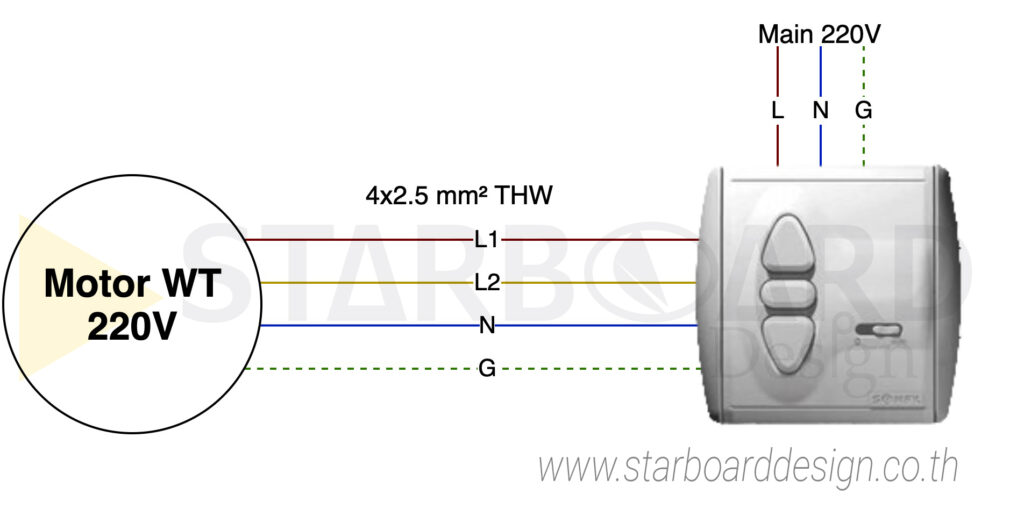
1. WT motors → controlled by a (wired) switch

  • Run cable from motor → switch Use THW cable, 2.5 mm² / 4 cores (L1, L2, N, G)

  • Run cable from mains → switch Use THW cable, 2.5 mm² / 3 cores (L, N, G)

Note: install the switch in a safe, easily reachable position for convenient use.

Wiring diagram: WT AC 220V motor with a control switch

Example wiring for a WT blind motor: 4×2.5 mm² cable from the motor to the switch, and 3×2.5 mm² mains cable into the switch

Good to know: WT motors cannot be linked so that several run from the same switch

WT motors are wired motors whose up–down–stop is controlled by 220 V directly from the switch. When you press a button, the switch sends 220 V straight to the motor’s “up” or “down” wire.

Why can’t several motors be linked together?

  • WT control signals are high voltage (not a digital signal).

  • Linking several motors can cause back-feeding if one motor is still powered,

  • which may create reverse voltage or a short circuit between the control wires → risking instant motor failure

The right approach

If you want to control several motors at once, you should:

  • use Dry Contact or a Relay-Compatible

  • use WT motors, but with a separate switch for each one

  • Alternatively, use a central control module designed specifically to keep the circuits separate

WT motors are easy to use and affordable, but each one must have its own separate control circuit Never link them together yourself, to avoid damaging the circuits and motors. If you need to control several at once, consult an electrical and motor specialist.

2. RTS motors → controlled by (wireless) remote

RTS systems can link several motors, with simple, economical, tidy wiring

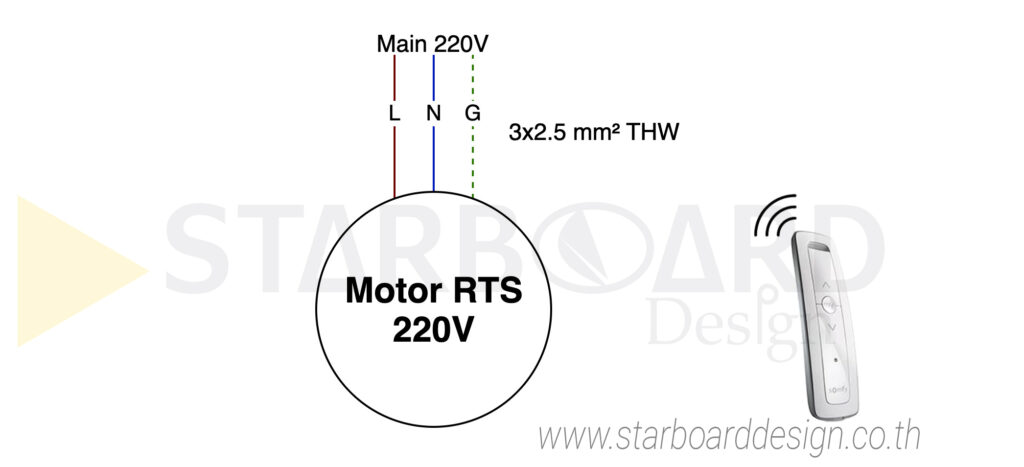
The RTS motor is a wireless system that receives commands from a radio remote or switch. No control wiring is needed — just a power cable to each motor — because it has a built-in receiver.

Run cable from mains → motor directly, using THW cable, 2.5 mm² / 3 cores (L, N, G)

Wiring diagram: RTS AC 220V motor controlled by remote

Example wiring for an RTS blind motor: 3×2.5 mm² cable from the mains directly into the motor

One cable run can serve 8 motors (with 2.5 mm² cable)

  • use THW 2.5 mm² cable Run the main supply above the ceiling

  • Link up to 8 RTS motors (~1 A per motor)

  • Connecting to a CB 16A breaker is sufficient and safe (with load headroom built in)

Tips for tidy wiring

  • Run just one main cable above the ceiling → saves cable and labour

  • Then branch a separate cable down to each motor, hidden in the ceiling

  • This keeps the installation clean and organised and makes future maintenance easier

3. WT motors → controlled by a home-automation system (220 V relay)

Run cable from Motor → home-automation system, using THW cable, 2.5 mm² / 4 cores (Forward, Reverse, Common, Ground)

Wiring diagram: WT AC 220V motor with a home-automation system

Example wiring for a WT blind motor: 4×2.5 mm² cable from the motor to the home-automation system

At Starboard Design we can help design your motorized blind system to support both remote control and smart-home (home automation) systems at the same time, for maximum convenience — whether you press the remote or give a command through the smart system.

Control from a remote and from smart-home systems such as KNX, Zigbee, Wi-Fi control, or an app

However, the control method for your blinds should be planned from the start so electricians and system installers can wire everything correctly for how it will really be used, avoiding costly changes later.

4. WT motors → controlled with Tuya's SmartLife app

  • Run cable from Motor → Tuya module, using THW cable, 2.5 mm² / 4 cores (L1, L2, N, G)

  • Run cable from Mains → Tuya module Use THW cable, 2.5 mm² / 3 cores (L, N, G)

  • The Tuya module can be installed at the motor itself, provided that position gets a strong enough Wi-Fi signal from the router.
Wiring diagram: WT AC 220V motor with the Smart Life app

Example wiring for a WT blind motor to a Tuya module controlled with the Smart Life app

For anyone who wants to control motorized blinds through Tuya’s smart-home system with the Smart Life app, Starboard Design offers Tuya modules that work with Smart Life, in 2 versions to suit your needs:

  • Control via the Smart Life app only
  • Control via both the Smart Life app and a remote (together)

So the system works exactly as you need, please let us know in advance at the design or ordering stage,
so our team can prepare the right module and install it correctly.

Choose the right cable and breaker sizes for the job

When wiring several motorized blind motors, you can’t simply link them all together — you need to calculate the current correctly for both the cable and the circuit breaker (CB), to prevent overheating, short circuits or nuisance tripping.

A real-world example

  • Motor current draw: 1 A per unit

  • Cable: THW 2.5 mm² Maximum current capacity approx. 16A

  • Recommended breaker: CB 16A

If you use several motors, refer to this table:

How many motors can be linked, by cable size

Cable size (THW)Max current (A)Motors that can be linked (1 A each)Recommended CB sizeNote
2.5 mm²16AUp to 816AAllow 50% load headroom
4.0 mm²22AUp to 1220A–25AAllows longer cable runs
6.0 mm²30AUp to 1625A–32ASuitable for combined cable runs
10.0 mm²40AUp to 2532A–40AFor large combined systems

Cable length causes voltage drop — use a larger cable for runs over 20 metres.

Start typing and press Enter to search

ไทยEnglish